Friday, May 29, 2015

Google introduce Google Pholes

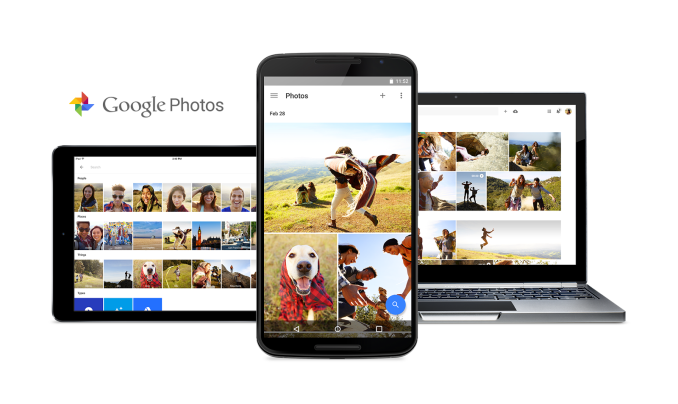
Today during their I/O 2015 Keynote Google announced Google Photos, a new service that will allow users to easily upload, edit, and share photographs from all of their devices. Google Photos seems like a reboot of Google's previous efforts for making a photo sharing service through Google+, and is instead a standalone product with its own dedicated apps and website.
Google's goal is that Google Photos will become a place where users can permanently store a continually growing collection of photos from their cameras and mobile devices. They also hope to improve upon the organization and sharing of photos, which has become a difficult problem to tackle with people taking and sharing more photos than ever.
The big promise of Google Photos is that the storage for your photos will be unlimited. This is a huge step above the measly 5GB of iCloud storage you can use with Apple's Photos offerings, and still an improvement over services like Flickr which offer users 1TB of storage. However, there is a caveat to the unlimited storage. While you aren't limited by the amount of photos or videos you can store, you are somewhat limited by their quality. Users who opt for unlimited storage can only store images at up to 16MP, and videos at 1080p. This shouldn't really affect any users who intend to use the service for storing photos from their smartphone, as most smartphone cameras have lower resolutions than 16MP.
There is another option for users who want to use Google Photos for their high resolution pictures from their DSLR or mirrorless camera, or who just have a very high resolution smartphone. Users can opt to have Google Photos use their Google Account's 15GB of storage, and with this option there are no limits to file size or resolution. Since many devices give away 1TB of free Google Drive storage, I suspect that this option will be popular among users who want to keep their photos in the highest possible resolution while staying within Google's ecosystem instead of going with another photo offering like Flickr.
The second half of Google Photos is how it will intelligently organize your photos. Google can analyze the content of photos and group them into categories based on their subject. While I haven't seen this in action, if it does actually work as well as Google claims then it would remove much of the hassle involved with organizing your photo collection.
Google Photos also allows for groups of photos to be shared. You can share a link to one of Google's automatically created groups, or you can make a collection of photos and get a single link to share them all at once. There's no need for the person you're sharing them with to have a Google+ account or to have the app installed.
In addition to grouping and sharing, Google Photos has all the other features that one would expect from a photos app such as simple color adjustments, cropping, and other editing controls. Google Photos will be available today across essentially all major platforms, with apps available for iOS, Windows, OS X, and an update to the existing Photos app coming on Android.

Thursday, May 28, 2015

Office Lens Android now available at Google Play Store

Thanks to the participation of more than 130,000 Google+ community previewers, we’re pleased to release Office Lens Android today. Called a “great app” by one tester, Office Lens turns your Android, iPhone or Windows Phone into a pocket scanner that works “flawlessly,” delivers “crystal clear images” and does an “excellent job of transcribing a printed page, despite edge distortion (page from a hardcover book),” according to other users.
First introduced for Windows Phone in March 2014, followed by the iPhone app early last month, Office Lens Android was the only version to have a public preview, which ran from April 2 to today’s formal release. Both iOS and Google+ communities quickly embraced the Microsoft capture app, with first-month downloads totaling more than 1.3 million for iPhone and 70,000 for the Android preview. To date, Windows Phone users have totaled 3.5 million Office Lens downloads.
Office Lens Android now available at Google Play Store 1
A before-and-after look at how Office Lens Android does an, “excellent job of transcribing a printed page,” according to one previewer.
The handy scanner app recognizes the corners of a document, whiteboard, electronic screen or any rectangular media and automatically crops, straightens, enhances and cleans up the image, then enables saving to OneNote or OneDrive for easy retrieval from any device.
With Android beta testers representing 270 makes of phones and just under 2,600 models, the Office Lens team worked hard to ensure a seamless user experience across all Android phones. As a result of a user experience refinements, Android phone owners share a feature with Windows Phone users: saving Office Lens images to multiple sources at the same time—for example, OneDrive and Word—which involves separate steps on the iPhone.
Office Lens Android now available at Google Play Store 2
From receipts to whiteboards, books to legal documents, the Office Lens Android pocket scanner recognizes the corners of any rectangular media and automatically crops, straightens and enhances the image, which can be saved to multiple sources at the same time.
Now available free in the Google Play Store, Office Lens was praised by an Android user for its “clean design.” It offers the following capabilities and features across all three phone platforms:
  • Converts images of paper documents, electronic screens and whiteboard notes into Word documents, PowerPoint presentations and searchable PDF files for easy storage, editing and reformatting.
  • Enables images to be sent via email, making it easy to share whiteboard notes with work colleagues, submit scanned business expense receipts or ensure family and friends have copies of important paper documents.
  • Captures business cards and generates contacts, which can be sent to OneNote and added to your phone.
  • Recognizes the corners of a document and automatically crops, enhances and cleans up the image.
  • Identifies printed text with optical character recognition (OCR) so that you can search by keyword for the image in OneNote or OneDrive.
  • Inserts images to OneNote or as DOCX, PPTX or PDF files in OneDrive, providing options to save, export and share the image.
Office Lens Android now available at Google Play Store 3Office Lens Android users will see the new OneNote location picker in the general release version, making it easy to decide where to save images and keep them organized.
We’re excited to introduce the final version of Office Lens, ensuring that Android users in 123 countries or areas, communicating in 30 languages have access to what’s quickly becoming the preferred scanner app. Please download your version of Office Lens today—AndroidiPhone orWindows Phone—and keep sending comments our way, either below, at the respective app store or our UserVoice site. Your feedback helps us understand what users like best and determine which features to deploy to other platforms.

Microsoft's age detection shows up in your Bing image searches

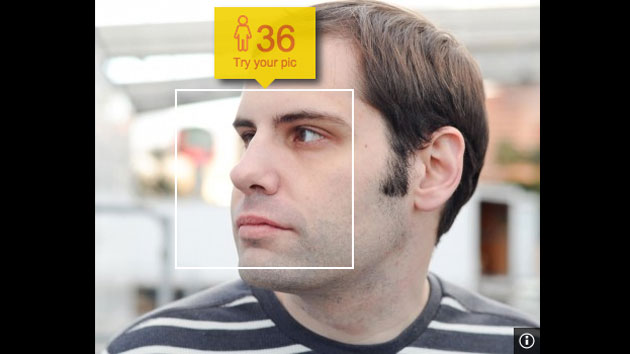
Bing's age detection (thankfully) gets it wrong
Microsoft's face-based age detection is still a little wonky (I'm thankfully younger than what you see above), but the company is clearly enamored with it -- you'll now find it inBing image searches. All you have to do is look for a person and, in most cases, roll over the picture to find a #HowOldRobot that will guess how many birthdays the subject has seen. The feature is available in at least North America, so give it a shot... if for no other reason than to giggle at its occasionally harsh appraisals of your looks.

Microsoft's new iPhone app could make Siri jealous


Cortana is coming to iPhone and Android

Microsoft’s “personal digital assistant” for Windows devices, Cortana, will soon take spoken commands on Apple and Android devices as well.

Microsoft announced Tuesday that a version of its Cortana app is coming to iOS and Android. Cortana will enter a crowded field of personal digital assistants on those platforms, dominated by Apple’s Siri and Google Now.

Microsoft has attempted to distinguish Cortana as a careful listener, responding not only to spoken commands but seizing on context to answer follow-up questions. Chattiness aside, Cortana will first have to break users of the habit of using convenient shortcuts to Apple and Google’s personal digital assistants, which have been tightly integrated into their respective operating systems.

Here’s more on Cortana for iOS and Android, via Microsoft:


The Cortana app can do most of the things Cortana does on your PC or on a Windows phone. You can have Cortana remind you to pick up milk the next time you’re at the grocery store, and then your phone will wake up and buzz with the reminder. You’ll be able to track a flight using Cortana on both your phone and your PC, and get the updates on the device that you’re on so you don’t miss anything. Everything in Cortana’s Notebook will show up across all your devices and any changes you make on one device will be reflected when you use Cortana on any of your other devices.

The new app comes as Microsoft unleashes a suite of mobile services across rival operating systems, beginning with Microsoft’s surprise roll out of free Microsoft Office apps last November.

Microsoft Office Lens, An App For Scanning Documents With Your Camera, Is Now Available As A Stable Release

Office Lens, which was released in a semi-private beta in April, is now widely available through the Play Store. The app had been on Windows Phone for quite a while and, continuing their pattern, Microsoft decided they wanted it on Android as well. Office Lens uses your phone or tablet's built-in camera to scan documents or whiteboards and convert them to PDF or office document formats. Here's an example of how it's supposed to work from the app info:
officelens1 officelens2
Of course, lots of things will affect how well it works in your experience. The lighting, the quality of the camera, steadiness of your hands, and untold other factors may result in far less success than Microsoft's example images.
The app enjoys tight integration with OneNote, which if you weren't aware is pretty great on its own. Office Lens says it will OCR your scanned documents, though it is unclear if this requires sharing it to OneNote or OneDrive. If you like to jot down notes on real paper but also like to store things digitally, an app like this can be critical to your workflow.
Unlike most of their recent releases, Microsoft says in their beta group that Office Lens works on devices running software as old as Jelly Bean 4.1. If you're interested, head to the Play Store and give it a spin.

Wednesday, May 27, 2015

Google rumored to launch two new Nexus phones this year


Google may roll out two Nexus phones this year -- but no Nexus tablet.

Made by LG, one new Nexus phone codenamed the LG Angler would offer a 5.2-inch screen, according to Android Police. The other phone, manufactured by Chinese vendor Huawei and given a code name of Bullhead, would reportedly sport a 5.7-inch display.

Basing the scuttlebut on a "reliable" source, Android Police gave the rumor a confidence rating of 7 out of 10, which means the odds are pretty good assuming the source is indeed reliable.

If true, this would mark the first time Google has released two Nexus phones in one year. By giving each phone a different screen size, Google may be trying to pull off the same feat as Apple -- offer one phone with a "relatively" smaller screen and another with a larger more phablet-sized display to capture as wide an audience as possible. The current Nexus 6 also is a beast of a phablet with a 6-inch screen. So Google may be looking to shrink the screen size to make this year's devices more accessible to the average consumer.

Details on the phone's specs are "tenative" for now, according to Android Police, and may have changed since the blog site received the information. But based on the source, the LG Angler would be powered by Qualcomm's 64-bit, hexa-coreSnapdragon 808 processor, the same high-end chip used in the LG G4 smartphone. The battery capacity would be around 2700mAh. The Huawei Bullhead would be equipped with aQualcomm Snapdragon 810 processor and offer a battery capacity of 3500mAh.

Both phones are likely to be released in October, the usual time frame for new Google Nexus devices. Google may announce the new phones this Thursday at its2015 I/O conference, but that's not a sure bet. Last year, the company didn't reveal the Nexus 6 at its2014 I/O event and instead waited until later in the year for the phone's debut.

And what of a new Nexus tablet? Nothing is in the works for this year, according to the source. No reason was revealed. But if true, that means last year's Nexus 9 would remain Google's current Nexus tablet.

Heads up: Google Glass may be coming back


According to reports last week in the Financial Times, Google really is working on a new version of Glass, the now-cancelled wearable device that became the poster child for clueless tech products creeping out normal people.

Google has claimed that it would continue working on the device since it stopped selling it in January, but until now there's been no word on what the company had in mind. Was it hoping to make a few tweaks and come up with a new marketing campaign and hope that would be enough for a successful re-launch? Or was the plan to completely scrap Google Glass as is and develop a new product based on what it learned from the first attempt?

FT.com reported on what Tony Fadell, the head of Google acquisition Nest who's now in charge of the Google Glass project, said earlier this month at a Google Zeitgeist conference in the UK. In his first public comments since taking charge of Glass, he indicated that the company has at least figured out that the device cannot re-enter the market as it was.

"We've decided to go and look at every detail, have no sacred cows and figure out the way forward," Fadell said.
Google Glass needs big changes

Frankly, that's the absolute minimum required to resurrect this product. As I've stated repeatedly, I see enormous potential in products like Google Glass, but the current implementations simply don't live up to the promise.

It seems that Fadell—and perhaps Google—finally see that. If so, here's what Fadell needs to do:

First, dump the Google Glass name, design, and market positioning. Glass was a marketing disaster of catastrophic proportions. Business schools should be using it as a case study in what not to do for decades to come. Whatever Google comes up with next, it should stay as far away from the Google Glass legacy as possible. No matter how good it is, if it reeks of the Glass "explorers," popularly dubbed "Glassholes" by the public, the project is doomed before it starts.

See also: How Google Glass set wearable computing back 10 years

Second, Google needs to fix the product's actual problems. Earlier this year, I listed the10 things the next version of Google Glass must have, and I still believe that all these changes are critical. But they all boil down to improving the experience for users and reducing the anxiety of people in the presence of the actual user.

For the user, that means vastly improving performance so using the device doesn't feel like test of the slow-motion video feature on your smartphone. For everyone else, it's about making it unmistakably obvious what the user is doing, what they may be recording, and whether they're invading anyone's privacy.

Oh, and Fadell may want to make the thing look less weird, too.

If he can do all that, he's an amazing genius. And he may actually succeed in reviving Google Glass. As long as he knows enough not to call it that.